Website Analysis: Is Your Site Ready for Google and AI Search?
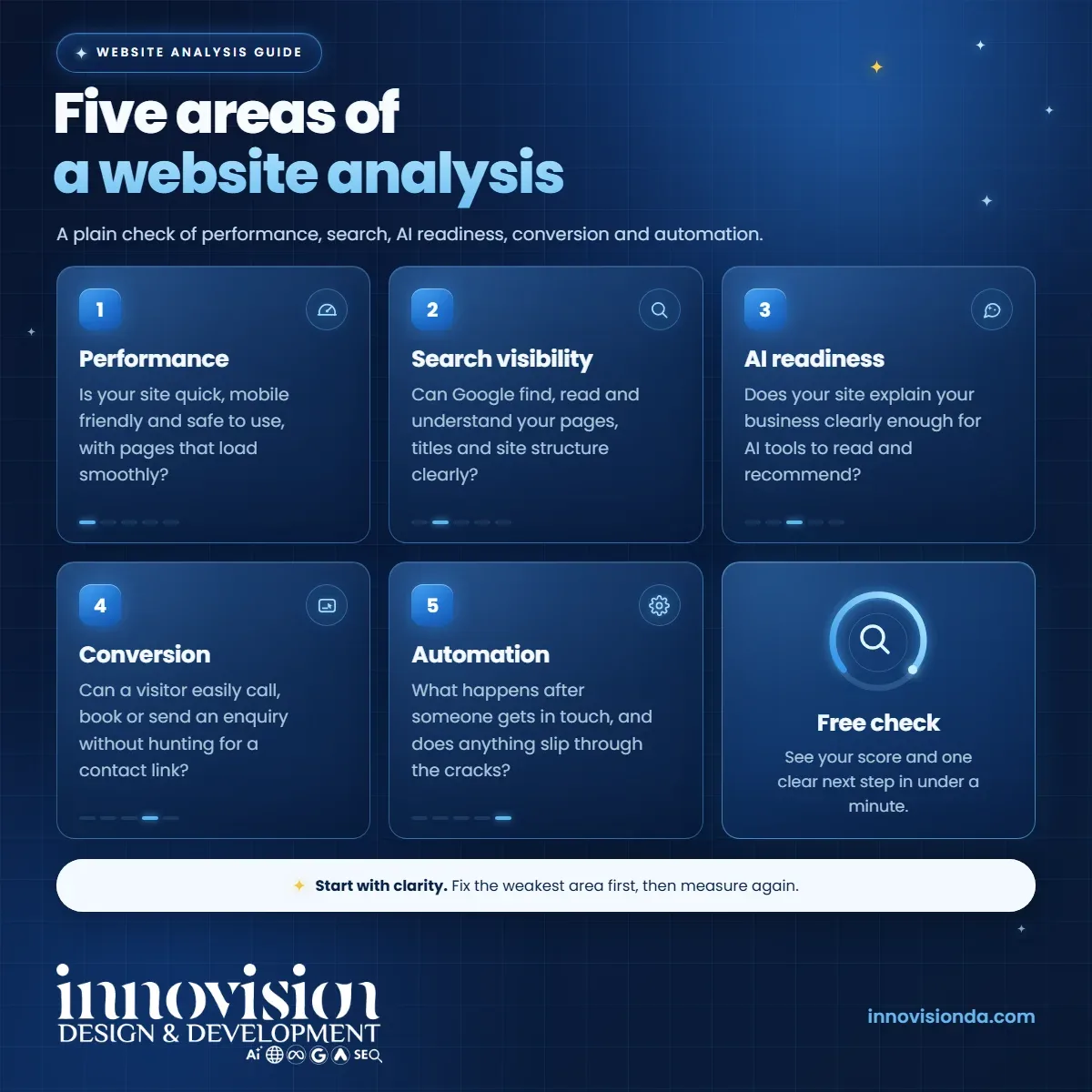
A website analysis shows how your site is doing across five areas, from speed to AI search readiness. Here is what each one means and how to check yours.
Innovision Code Team 9 min read
Most business owners know their website matters, but very few know how it is actually doing. Is it fast on a phone? Can Google understand it? Could an AI assistant explain what the business does? Does it turn visitors into enquiries? A website analysis answers those questions in plain language, so that you can decide what to improve first instead of guessing.
This guide explains the five areas that our free website analysis looks at, what each one means for a small business and what to do about the results. It also includes an honest note about AI search, because nobody can promise that your business will appear in an AI answer, and you should be cautious of anyone who does.
In this guide
- What a website analysis is, and what it is not
- Area one: performance and experience
- Area two: search visibility
- Area three: AI search readiness
- Area four: conversion
- Area five: automation opportunities
- How the score and the recommendation work
- What nobody can promise about AI answers
- Run your own website analysis
What a website analysis is, and what it is not
A website analysis is a structured check of your public website. It looks at the pages a visitor or a search engine can see and reports what is working, what could be better and why it matters. Think of it as a regular health check: it does not fix anything by itself, but it gives you a clear list of what to look at.
It is just as important to say what a website analysis is not. Ours reads your public pages from our own server, the way a search crawler that does not run scripts would. It cannot see your search rankings, your visitor numbers, what AI assistants say about you or anything inside your business. Speed figures come from a single visit, so treat them as a guide rather than a full speed test. Where something could not be checked, the report says so instead of guessing.
With that in mind, here are the five areas, in plain words.
Area one: performance and experience
This area asks a simple question: is your website pleasant and safe to use? Visitors rarely wait for a slow page, and many of them arrive on a phone.
A website analysis in this area looks at how quickly your server starts to answer, how heavy your pages and images are, whether the site is set up for phones, whether it uses a secure connection (HTTPS), whether links lead to real pages and whether the basics of accessibility are in place, such as image descriptions and form labels.
The next step is usually practical and unglamorous: compress large images, remove scripts you do not need, fix broken links and make sure the site fits a small screen. These small changes often make the biggest difference to how your site feels.
Area two: search visibility
Search visibility is about whether Google can find, read and understand your pages. A beautiful site that search engines cannot read is like a shop with no sign.
A good website analysis checks whether your home page can be indexed, whether your titles and descriptions are clear, whether your headings give the page a sensible structure, whether you have a sitemap and a robots file, how your pages link to each other, whether structured data describes your business and whether local details such as your address and phone number are easy to find.
If this is the weakest area on your report, our overview of AI SEO explains how clear titles, helpful content and a well described business work together over time.
Area three: AI search readiness
More people now ask AI tools for recommendations, so it makes sense to ask whether your website explains your business clearly to those tools. This area is about clarity, not tricks.
In this part of the website analysis we look at whether the first paragraphs of your home page explain what you do and for whom, whether your services are described in structured data, whether common customer questions are answered on the page, whether your business details are stated in a form machines can read and whether your robots file blocks AI crawlers. We also note whether the text of your page is delivered with the page, because crawlers that do not run scripts may otherwise see very little.
We also check for an optional file called llms.txt, but we are careful to say that it is optional. Google states that you do not need to create new machine readable files, AI text files or markup to appear in its AI features. A missing llms.txt file is a small note on the report, not a problem.
For a closer look at this topic, see our page on ChatGPT visibility.
Area four: conversion
Conversion is the part that pays the bills. It asks whether a visitor who likes what they see can easily call, book or write to you.
A website analysis in this area looks at whether your phone number and contact options are easy to find, whether a phone number can be tapped to call on a mobile device, whether a short enquiry form exists, whether online booking is available, whether each page has a clear next step and whether proof of trust, such as reviews or years in business, is visible. It also considers how easy it is to enquire from a phone.
One honest caution applies here. If a contact form or a booking tool is added by scripts after the page loads, a simple check of the page code may not see it. In that case the report says that it could not find the form in your page code, and that search engines and AI tools may not see it either. It does not claim that visitors cannot contact you.
Area five: automation opportunities
The last area looks at what happens after someone gets in touch. Does the visitor get an instant reply? Is there a way to book without a phone call? Is there any sign that enquiries are tracked and followed up?
We separate two kinds of findings in this area. The first is what is seen on your website, such as a chat tool, a booking link or a form tool in the page code. The second is a short list of things worth asking about, such as whether a visitor receives a confirmation after sending a form and whether someone follows up when there is no answer. Those cannot be seen from the outside, so they are suggestions for a conversation, not claims about your business.
If this area stands out, our guide to AI automation shows how instant replies and automatic follow ups work in practice.
How the score and the recommendation work
Each area receives a score, and the five scores are combined into one number out of 100. The areas do not count equally: search visibility and conversion carry the most weight by default, and an area that cannot be checked is left out so that it does not unfairly lower your result.
The report then shows three priority opportunities that are specific to your findings, followed by one clear recommendation and, where it makes sense, a second optional one. The recommendation follows documented rules, and it does not simply suggest the biggest package. A site with good speed and clear content but weak lead handling is pointed toward lead handling. A site that needs a rebuild is pointed toward a new website. Pricing for every option is on our pricing page.
What nobody can promise about AI answers
This deserves plain speaking. No agency, tool or consultant can guarantee that your business will be mentioned in an AI answer. The systems change, they are not under the control of any one company and the same question can produce different answers on different days.
Google says as much about its own AI features. Its guidance states that there are no additional requirements to appear in AI Overviews or AI Mode, and that indexing and serving are not guaranteed. You can read the full explanation in the Google Search documentation on AI features and your website.
What you can do is make your website easy to understand: clear writing, accurate details, helpful answers and a site that works well. A website analysis shows you where you stand on those basics. It does not promise a ranking, and any honest report will tell you so.
Run your own website analysis
The simplest way to learn how your site is doing is to try it. Our free website analysis takes under a minute. You enter your website address, and you do not need to give a name or an email to see your results. You will see your score, five area cards with what is working and what to improve, three priority opportunities and a recommendation chosen for your findings.
If you would like the full report as a branded page that you can keep or print, you can ask us to email it. And if you would rather talk it through, you can ask for a free growth plan, and we will reply within 2 business days with practical next steps and an exact quote, with no obligation.
Frequently asked questions
What is a website analysis?
A website analysis is a structured check of your public website that shows what is working, what could be better and why it matters. Ours covers performance, search visibility, AI search readiness, conversion and automation opportunities.
Is the free website analysis really free?
Yes. You enter your website address and see your results on screen. You do not need to give a name or an email unless you would like the full report emailed to you.
Can a website analysis guarantee that I will appear in ChatGPT or Google AI answers?
No. Nobody can guarantee that. Google itself states that appearing in its AI features is not guaranteed. A website analysis shows how clear and readable your site is, which is the part you can control.
Why might a website analysis miss my contact form?
Some forms and booking tools load with scripts after the page is delivered. A simple check of the page code may not see them, and neither may some search engines or AI tools. The report words this carefully and does not claim that visitors cannot reach you.
How often should I check my website?
A good habit is to check after any major change to your site and once or twice a year otherwise. Compare the results over time rather than looking for a perfect score.